
Project Close
Team - Retrospective
Before or during a project close we must schedule team meetings to:
- Go trough and fill the document
Project Close Template - During the PipeCodes weekly meeting share the case study with the team, insights, results, learnings and ask for more backlog ideas
Client - Requests
1- Website/App powered by PipeCodes
- If client approved the whatermark, add it to the footer on everypage
- If not, ask if we still can add it
- Use the following HTMLÂ
- Available image sources to use (based on website look & feel):
https://pipecodes.com/wp-content/uploads/powered_by/powered_by_pipecodes_white_color.svg
https://pipecodes.com/wp-content/uploads/powered_by/powered_by_pipecodes_white_white.svg
https://pipecodes.com/wp-content/uploads/powered_by/powered_by_pipecodes_black_color.svg
https://pipecodes.com/wp-content/uploads/powered_by/powered_by_pipecodes_black_black.svg
<a href="https://pipecodes.com/" title="Made with love by PipeCodes" target="_blank"><img style='max-width: 130px;min-width: 130px;' alt="Made with love by PipeCodes" src="https://pipecodes.com/wp-content/uploads/powered_by/powered_by_pipecodes_white_color.svg" title="Made with love by PipeCodes" /></a>
2- Project Review and Online Rating
- Ask the client to respond to our internal Review Form –
Âhttps://docs.google.com/forms/d/1koMEfm_ICtri_BRxsZu28R3uEhCRP-8NYRjw6of4998/edit - Schedule a project review/close call
- Ask the client for a review on Google and/or Trustpilot
- https://www.google.com/search?hl=pt-PT&gl=pt&q=PIPECODES,+Edificio+NERE,+R.+Circular+Norte+do+Parque+Industrial,+7005-841+%C3%89vora&ludocid=17213704897146624396&lsig=AB86z5W-ZM2-R9QlTX_MX7jiqgt5#lrd=0xd19fb07299715af:0xeee35d66ded3998c,3
- https://pt.trustpilot.com/review/pipecodes.com
3- Referal
- During the project review/close call, ask the client if he knows someone who might be interested in PipeCodes help.
4- Cross selling / Resell
- Some weeks before the project ends start negotiating the Maintenance & Support Plan
- Analyse and sell the backlog
5- Warranty
- Our 30 days warranty can only be used to solve critical bugs
- Be aware at this fase for new requests VS bugs, specially if project budget was already consumed > try always to negotiate
- Our warranties must only start if:
- Project was totally invoiced and paid
- Maintenance package was already subscribed (we should add this in our contracts)
Case Study
1- Create the website/ presentation case study
- After the project is completed/launched, we can move forward with creating the case to publish on the respective page on the PIPECODES website;
- The PIPECODES case studies can be seen at this link https://pipecodes.com/pt/casos-de-estudo/ and https://pipecodes.com/case-studies/;
- The Case Studies page presents several categories that function as filters and correspond to the area of the project/client/work developed. Each case study can be associated with more than one category;
- To create the contents of the case studies, here is the necessary information (which must be provided by the project manager, inserting the bull points in this file):
- – Photographs and representative images (which must be preferentially on mobile/desktop/tablet screens) – examples https://prnt.sc/zNdaZHy8LBA- and https://prnt.sc/zzLeA0KiVQ-q;
- Information about the company (brief description);
- Key topics (indicate general bullet points about the project);
- Mention the partners, technology used, and solutions (e.g.: UI and UX, Ecommerce);
- Explain what challenge the client presented to us;
- Describe the solution we implemented, including indicating the different phases of the project (if applicable);
- List the results obtained by the client (We do not always have access to this information, and in these cases, we must indicate the expected results. In situations where we have access to the results obtained, we can choose one of two approaches: ask the client if we can use X indicators and metrics, OR disclose the case anonymously – Heal Me example);
Case studies do NOT usually have links to client websites, as we want the client to stay on the PIPE website.
- ATTENTION: projects that are considered confidential, naturally the case studies are not disclosed with the naming, branding and/or other elements that could identify the client. In some cases (which involve legal or bureaucratic issues), the case study is not even published;
- The content briefing for the case study is done directly in this template, in both languages, Portuguese and English;
- Once the content is finished, a task is created for André (or another available team member) to enter the copy on the respective case study page/ to create the respective case study page in Elementor.
- The structure of the case study pages must be respected both in the excel file of the briefings and in Elementor itself.
2- Create the LinkedIn post and mark the client and brand
- Before the publication is made on LinkedIn, it is recommended to approach the client and inform them that we have this intention. Understand what the opening is for us to publish, reinforcing that it will be a win-win for both companies.
If you agree, we publish it, and the client will receive notification on their LinkedIn pages that we have tagged them. The expectation is that the customer will share our post, so that we can increase the reach and credibility of the brand. - Based on the content on the case page on the PIPECODES website, the respective briefing must be prepared for publication on social media, using the template we use. See example here.
- The briefing must be done at least 10 days in advance, before the scheduled publication date. So we have time to submit approval, adjust if necessary and design.
- To create the briefing, you can contact the team involved in the project, so that they can provide you with some additional information.
- The content is made in Portuguese and published in the same language, on PIPECODES’ LinkedIn. The exception occurs when the client is foreign, and in this case, the briefing must have both PT and EN versions, starting with the Portuguese one. The same happens in the LinkedIn publication, which will have PT and EN indication – example here https://prnt.sc/Umt61B77MR2S
Pay attention to the day and time of posting – avoid posting on Monday morning and Friday afternoon.
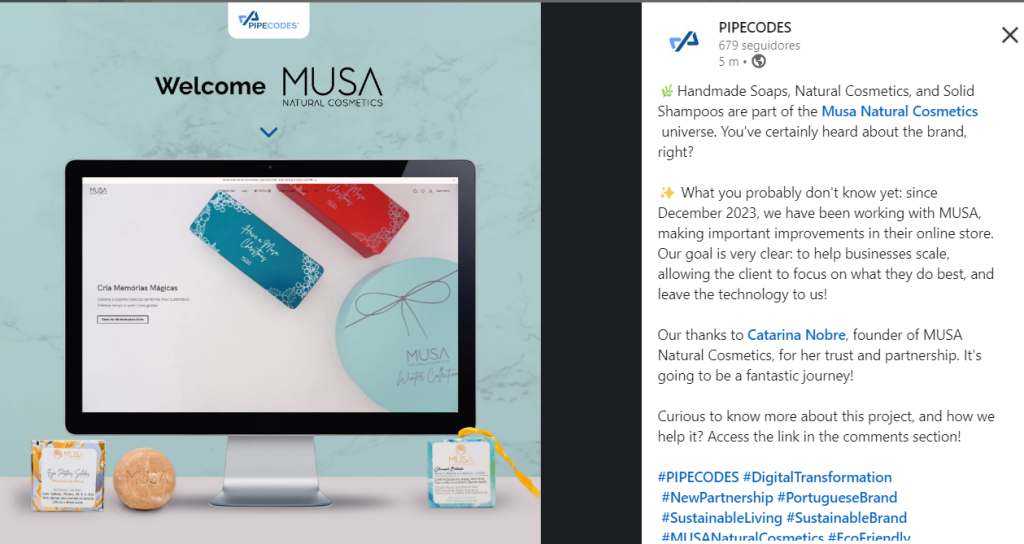
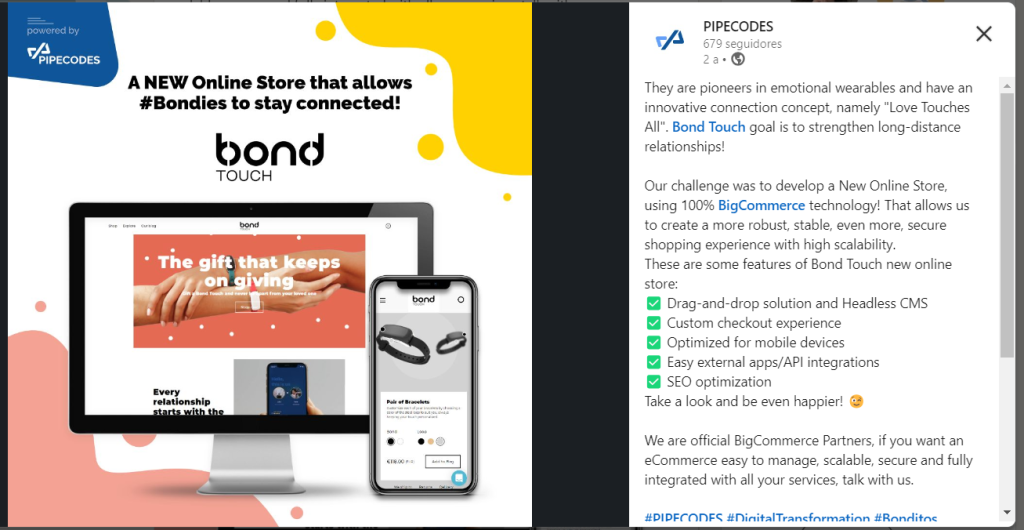
- Consider this example of content, style, tone, hashtags, mention, and design (image below – ask André for the design). See example post here.
- Some mandatory requirements for this type of publication:
– Mention the company’s LinkedIn account;
– Mention the LinkedIn profile of the company’s CEO/Founder;
– Brief description of the client’s project: what it is, what the objective is;
– Framing of the challenge VS solution delivered by PIPECODES;
– Add hastags related to the theme, project, PIPECODES;
– In some cases, it may be relevant to mention the technology used or the partner who helped us complete the project (see BondTouch example post;
– Link to the case study page on the PIPE website, must be placed in the first comment of the post (https://prnt.sc/uyPQYCIwQmFy); - For some projects, it may also be relevant to wait for the client to disclose/coordinate the disclosure with the client, and then we reshare the client’s content/publication (WTVision example post).
3- Add the client logo to presentations and website
- When the project is completed, you must create a task for André Vicente, on the PIPECODES board on trello, in the “Design_André Tasks” column https://prnt.sc/IxpsfcJWAcuo
- In this task, they must indicate what needs to be updated and where, for example:
– Add the customer’s logo to the PIPECODES website, in the customer block, in the PT and EN version;
– Include the web address of the client’s website in the task, if it is necessary to collect any visual elements.
– Add the client’s logo to the PIPECODES template files, in PT and EN versions;
If possible, upload the logos to the task immediately, to make everyone’s work easier.
4- More branding info at:Âhttps://trello.com/c/dncnNAo7/2-brandbook-templates-and-others
Please do not change the information in the description of this task (unless of course it is to update a link).